pMTnet Omni Tutorial
Although pMTnet Omni works well with its default setting, we do provide the users with various parameters so that our tool can be configured to cater to your needs.
In this section, we will provide a relatively detailed explanation on important parameters that you can tweak.
Step 1: Instantiation
pMTnet Omni starts by instantiate a pMTnet_Omni_class object.
There are only two parameters needed to accomlish this.
Parameter |
Input Format |
Acceptable Inputs |
Default |
Note |
|---|---|---|---|---|
model_device |
|
“cpu”, “gpu”, None |
None |
If |
seed |
|
Any integer, None |
None |
If |
Step 2: Data Importing
During our internal testing, we found that while a mediocre GPU is capable
of handling several to hundreds of pairs, for dataset containing thousands of
TCR-pMHC pairs, we usually will run out of memory. Partitioning the original
data frame is a simple yet effective remedy. Therefore, we
provide a parameter partition_size for this exact purpose.

Suppose the user’s data contains 5000 TCR-pMHC pairs.
By setting partition_size=2000 we will partition the
original data frame into three partitions with
2,000, 2,000, and 1,000 pairs, respectively.
Parameter |
Input Format |
Acceptable Inputs |
Default |
Note |
|---|---|---|---|---|
partition_size |
|
Any integer |
500 |
If |
Step 3: TCR-pMHC Affinity Prediction
There are quite a lot you can configure at this stage.
Parameter |
Input Format |
Acceptable Inputs |
Default |
Note |
|---|---|---|---|---|
compute_percentile_rank |
|
True, False |
False |
If False, only the raw affinity scores will be reported. |
rank_threshold |
|
Any number between 0 and 1 |
0.03 |
The rank percentile threshold greater than which further verification is NOT conducted |
B |
|
Any positive integer |
1 |
Number of trials |
check_size |
|
List of positive integers |
[1000, 10000, 100000] |
Explanations provided below |
load_size |
|
Any positive integer |
1,000,000 |
Explanations provided below |
minibatch_size |
|
Any positive integer |
50,000 |
Explanations provided below |
In general, to get the final percentile ranks for each one of the TCR-pMHC pairs you provided in the dataframe, two steps are involved: getting the raw affinity scores and (you guessed it) computing the percentile ranks.
Raw Affinity Scores
If the argument compute_percentile_rank is False, the
program will halt. And only the raw affinity scores will
be reported. The rest of the parameters won’t matter.
On the other hand, if compute_percentile_rank=True,
the program will proceed to the next stage.
Percentile Ranks
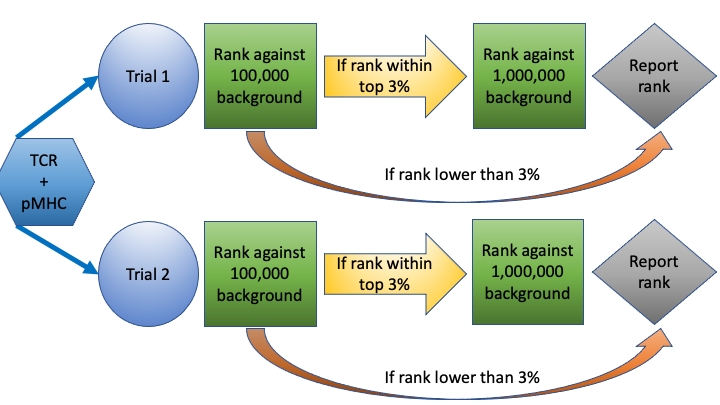
In this stage, we will compare each pair with the background TCRs. As we have millions of background TCRs, it would be time consuming to check each pair against the entire database. Hence, in our implementation, we borrowed an idea from the literature of clinical trials.
Each TCR-pMHC pair will undergo one or several “trials”, each with a sequence of checks. The procedure is conceptually simple:
Within a “trial”, each TCR-pMHC pair will be first checked against a small subset of the background TCRs. If the predicted binding is strong enough, we sample a larger subset of the background TCRs and check the given pair against them. The process repeats until either the pair falls out of the top rank list or it has been validated against enough background TCRs, at which point, the algorithm reports the final rank.
Two parameters load_size and minibatch_size could be somewhat confusing. But they
are implemented to further speed up the prediction process.
load_size is implemented so that for each trial, only that many background TCRs will
be potentially used. This is because the background TCRs datasets are relatively large,
meaning that initializing the dataloaders will be time consuming.
minibatch_size is how many background TCRs the dataloader will sample within a check_size.
For example, is the current check_size is 2,000 and the minibatch_size is 1,000. Then
the dataloader will first load 1,000 TCRs, compute the rank, load another 1,000 TCRs, and
update the rank. This will speed up the process as directly load, say 1,000,000 TCRs will
be slow.
Sample Output

We also provide other supporting files for your to download.
Parameter Summary
Parameter |
Input Format |
Acceptable Inputs |
Default |
Note |
|---|---|---|---|---|
model_device |
|
“cpu”, “gpu”, None |
None |
If |
seed |
|
Any integer, None |
None |
If |
partition_size |
|
Any integer |
500 |
If |
compute_percentile_rank |
|
True, False |
False |
If False, only the raw affinity scores will be reported. |
rank_threshold |
|
Any number between 0 and 1 |
0.03 |
The rank percentile threshold greater than which further verification is NOT conducted |
B |
|
Any positive integer |
1 |
Number of trials |
check_size |
|
List of positive integers |
[1000, 10000, 100000] |
|
load_size |
|
Any positive integer |
1,000,000 |
|
minibatch_size |
|
Any positive integer |
50,000 |